
I Didn't Know PDFs Have Input Boxes: Filling IRS Tax Forms Programmatically
Someone asked me to design a way to print computed values onto U.S. tax forms. The interesting part is the layer in between. They already have the taxpayer’s numbers, and the IRS form is a fixed template that never changes. What’s missing is a portable description that says, for every box on the page, which value goes there, where the box sits, and how the number should look. Someone else’s code reads that description and does the printing.
I picked Form 1040 and Schedule C, downloaded the real PDFs, and immediately
started worrying about the boring part. Page one of a 1040 has 128 boxes on it.
Every one of them needs an x, a y, a width and a height, accurate to about a
point, or the number lands on top of a printed label instead of inside its box.
I was mentally budgeting an afternoon of opening the PDF in a viewer, hovering
over boxes, and writing down numbers I’d have to double-check anyway.
The coordinates were already in the file
Before starting that, I opened one of the PDFs to see what I was dealing with. The IRS ships these as AcroForm documents: interactive PDFs, the kind you can type into in Preview or Acrobat. Every one of those typeable boxes is a real object inside the file, and every one carries its own rectangle.
I had been opening PDFs for years without ever thinking about this. The coordinates I was about to spend an afternoon measuring by hand were sitting in the file already, exact, put there by whoever built the form at the IRS.
Pulling them out with pdf-lib took about twenty lines.
A field can own more than one widget, since the same logical field is sometimes
drawn in several places, so you walk widgets rather than fields. Each widget
carries its rectangle in /Rect and a reference to its page in /P:
const doc = await PDFDocument.load(pdfBytes);
const pageIndex = new Map(doc.getPages().map((p, i) => [p.ref.toString(), i]));

for (const field of doc.getForm().getFields()) {
  for (const widget of field.acroField.getWidgets()) {
    const { x, y, width, height } = widget.getRectangle();
    const pageRef = widget.dict.get(PDFName.of("P")) as PDFRef | undefined;
    boxes.push({
      id: field.getName(),
      page: pageRef ? pageIndex.get(pageRef.toString()) ?? 0 : 0,
      rect: { x, y, w: width, h: height },
    });
  }
}
One run produced a skeleton with every box on both forms, in PDF points, on the right page. This is the entry for the box the taxpayer’s first name goes into:
{
  "id": "topmostSubform[0].Page1[0].f1_14[0]",
  "page": 0,
  "rect": { "x": 36, "y": 684, "w": 215.25, "h": 14.001 }
}
x: 36 is exactly half an inch in from the left edge, y: 684 puts the box’s
bottom edge 684 points up a 792-point page, and the box is 215.25 points wide.
Nobody measured any of that. The afternoon I’d budgeted turned into a few minutes
of waiting.
There’s a catch, and it’s the interesting half. The names are stable and completely opaque. The file knows precisely where the box is and has no idea it’s where your first name goes.
So I wrote a second small script that stamps the form with its own field ids. It outlines every widget rectangle in red and prints the id inside it in tiny blue type, then saves that as a new PDF.
page.drawRectangle({ x, y, width, height, borderColor: rgb(1, 0, 0), borderWidth: 0.4 });
page.drawText(shortId, { x: x + 0.5, y: y + 1, size: 4.5, font, color: rgb(0, 0, 1) });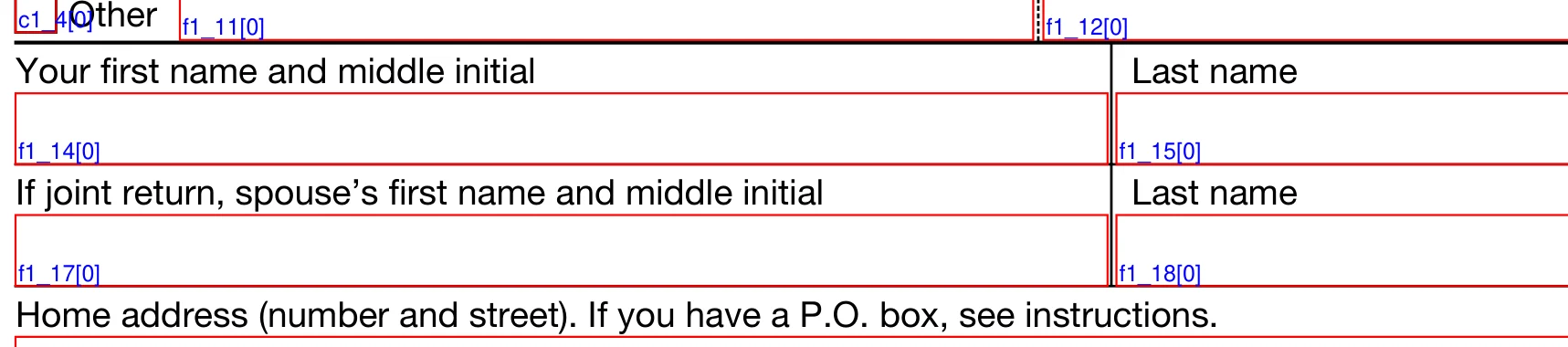
Open that next to the skeleton and the mapping is there to read. f1_14 is “Your
first name and middle initial”, f1_15 is the last name beside it, f1_47 is
line 1a, wages.
The map prints only the last segment of each name, which fits inside a box but
isn’t always unique. Two different boxes on page one both end in c1_8[0]: one
at x: 97.6, the Single checkbox, and one at x: 349.6, Head of household. The
full path separates them, and copying by short name alone silently ticks the
wrong box.
So the whole thing turns into a lookup, with one limit. Deciding that f1_14
holds the first name is still a human with a marked-up PDF for twenty minutes.
What it buys is that the coordinates are never typed by hand and never wrong.
One deliberate decision on top of that. I copied the rectangles into my own format rather than having the renderer look them up from the PDF at draw time. Reading them live would have been less code, but it would have quietly made the format depend on the source form being interactive, and plenty of real forms are scans or have been flattened along the way. So the AcroForm layer gets used once while authoring, and the format itself never knows it existed.
Then the form starts fighting you
With coordinates solved, I assumed the rest was placing strings at points. The form had opinions.
Your SSN is one value in three boxes. The form prints the social security number in a combed field, split 3-2-4 with dividers between the groups. The AcroForm layer disagrees. It hands you one rectangle for the whole thing:
{ "id": "…Page1[0].f1_16[0]", "rect": { "x": 469, "y": 684, "w": 107, "h": 14.001 } }The field is flagged as a comb with a MaxLen of 9, so typing 123456789 into
it in Acrobat works: the viewer spaces the characters across the dividers itself.
My renderer draws a string at a point and knows nothing. So this is one of the
few places I authored geometry by hand, carving that 107-point box into the three
groups the dividers imply, and a field’s rect became either one rectangle or an
array of them:
{
  "id": "taxpayer.ssn",
  "type": "ssn",
  "value": { "$ref": "taxpayer.ssn" },
  "split": "chars",
  "rect": [
    { "x": 472, "y": 684, "w": 28, "h": 14 },
    { "x": 508, "y": 684, "w": 20, "h": 14 },
    { "x": 533, "y": 684, "w": 42, "h": 14 }
  ]
}
The renderer strips the value down to nine digits, groups them 3-2-4, and centers one group in each rectangle.
Filing status is five checkboxes over one value. There’s no radio-group
concept on the page, just five separate squares where exactly one gets an X. I
was about to add a radio field type before noticing I didn’t need one. A
checkbox that draws only when its reference equals a given value covers it: five
checkbox fields, all pointed at taxpayer.filingStatus, each with a different
when.equals. The grouping falls out of the data instead of the type system,
which left one less concept in the spec.
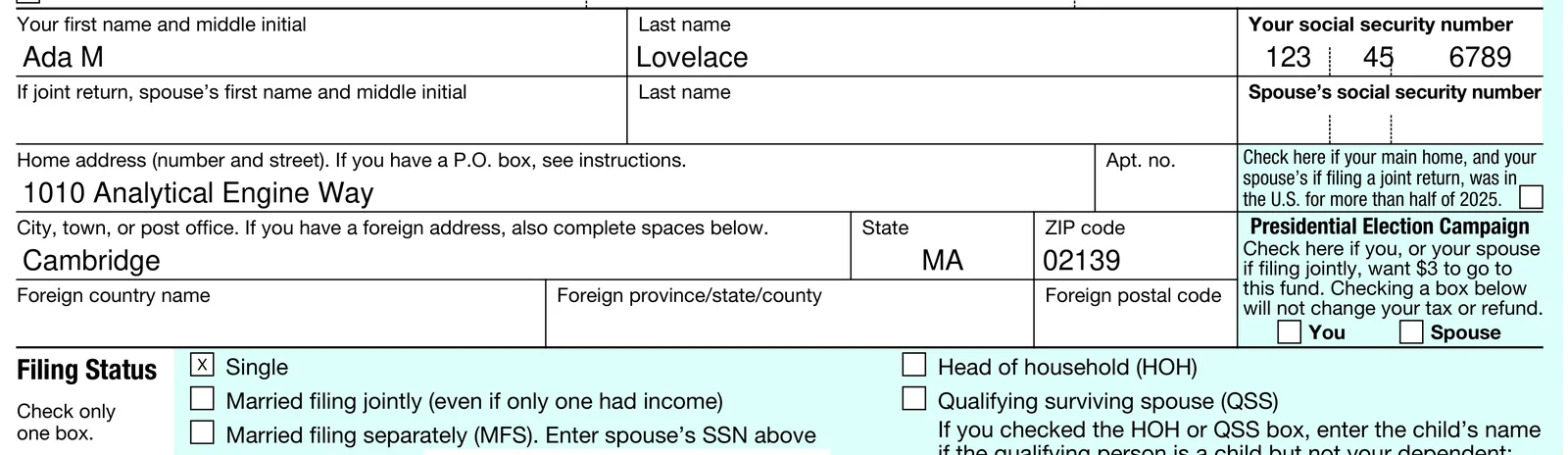
One value across three boxes, and a checkbox that only draws because the filing status matched.
Schedule C’s expense list repeats. Schedule C is where a sole proprietor reports business profit or loss, and its Part V is a plain list: write down any expense that didn’t fit the categories above, one per row, amount on the right. Nine blank rows, which means eighteen boxes to place.
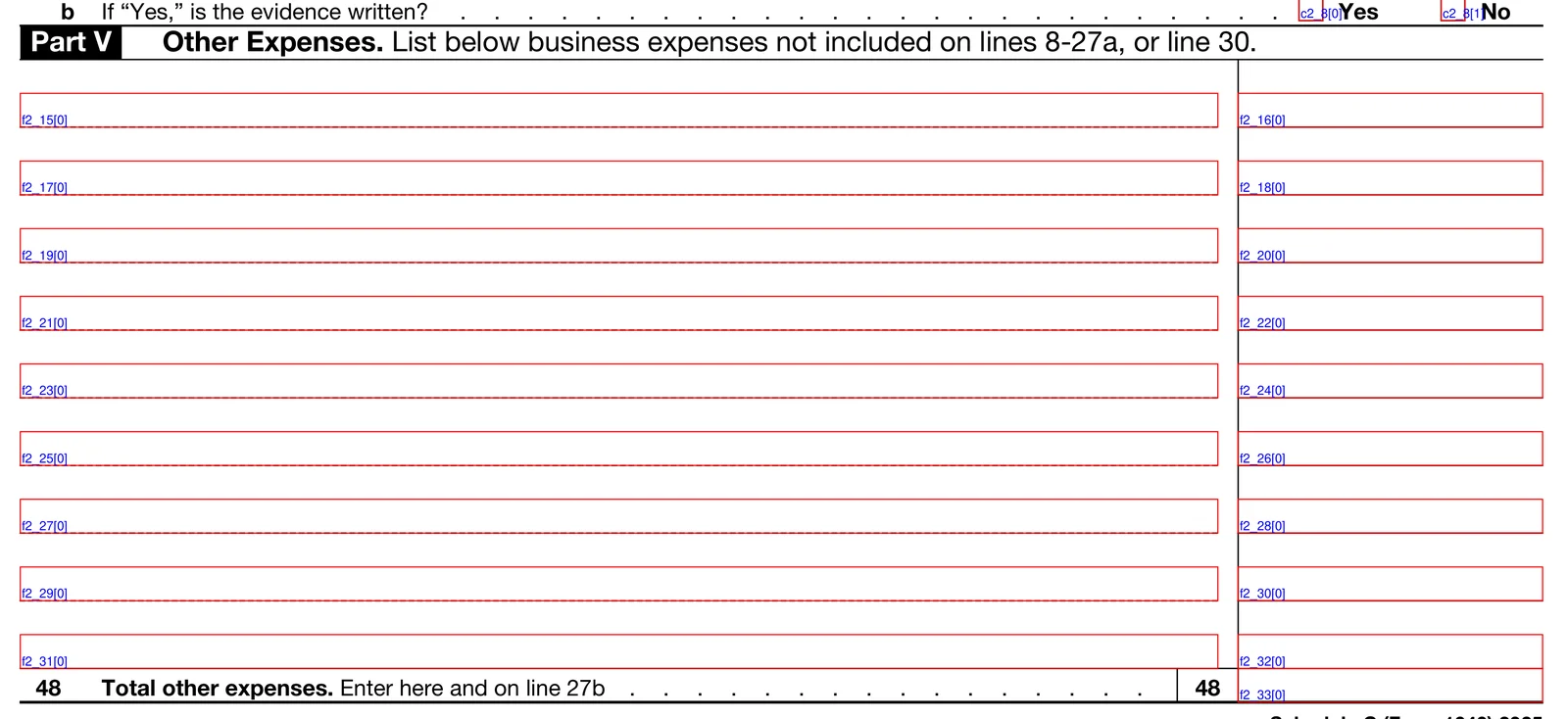
The same field map trick, run on Schedule C page two.
Worth looking at what the extraction returns for those eighteen boxes, because only one of the four numbers is doing any work:
description                      amount                       step
f2_15  x 36  y 239.998  w 424.8  f2_16  x 468  y 239.998  w 108
f2_17  x 36  y 215.997  w 424.8  f2_18  x 468  y 215.997  w 108  -24.001
f2_19  x 36  y 191.996  w 424.8  f2_20  x 468  y 191.996  w 108  -24.001
f2_21  x 36  y 167.995  w 424.8  f2_22  x 468  y 167.995  w 108  -24.001
f2_23  x 36  y 143.994  w 424.8  f2_24  x 468  y 143.994  w 108  -24.001
f2_25  x 36  y 119.993  w 424.8  f2_26  x 468  y 119.993  w 108  -24.001
f2_27  x 36  y  95.992  w 424.8  f2_28  x 468  y  95.992  w 108  -24.001
f2_29  x 36  y  71.991  w 424.8  f2_30  x 468  y  71.991  w 108  -24.001
f2_31  x 36  y  47.990  w 424.8  f2_32  x 468  y  47.990  w 108  -24.001
Both x values repeat unchanged down the whole block, both widths repeat, and
every row sits exactly 24.001 points below the one above it. Part V was laid out
on a 24-point grid, and the extracted coordinates say so plainly enough that you
don’t have to measure anything to find out.
Which means pasting all eighteen rectangles into the annotation would be recording the same two rectangles nine times. The block becomes one field instead: declare the two columns once at the first row’s position and give it a stride.
{
  "id": "partV.otherExpenses",
  "type": "repeat",
  "page": 1,
  "from": { "$ref": "otherExpenses" },
  "maxRows": 9,
  "rowHeight": 24,
  "columns": [
    { "id": "description", "type": "text",     "rect": { "x": 36,  "y": 240, "w": 424.8, "h": 12 },
      "value": { "$ref": "$row.description" } },
    { "id": "amount",      "type": "currency", "rect": { "x": 468, "y": 240, "w": 108,   "h": 12 },
      "layout": { "align": "right" }, "value": { "$ref": "$row.amount" } }
  ]
}
$row points at whichever array element the renderer is on. I rounded the stride
to a flat 24, which drifts 0.008pt by the ninth row and is invisible on paper.
Stepping down means subtracting, because PDF coordinates put the origin at the
bottom-left and count y upward. I got that backwards on the first run and
printed a very tidy expense list off the top of the page.
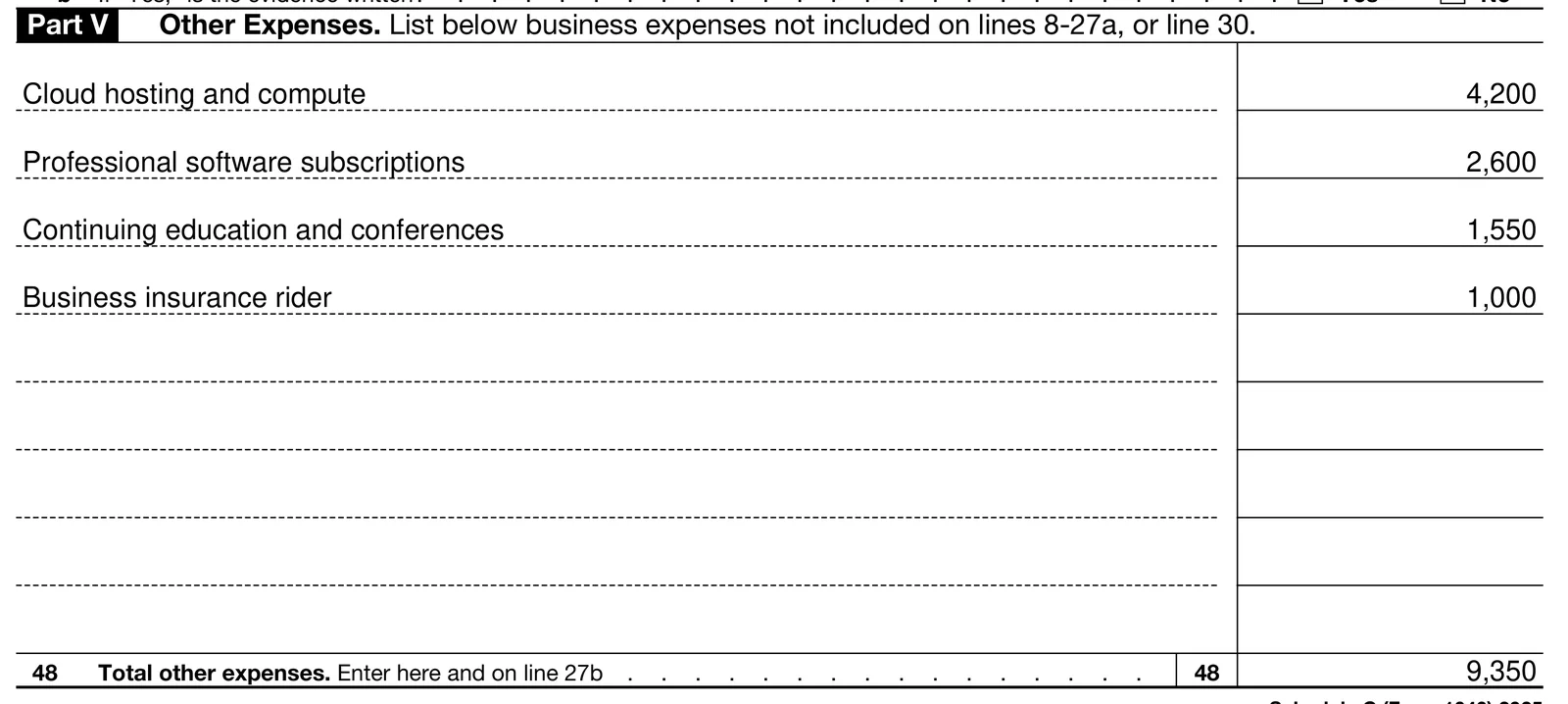
Four array elements, one annotation, nine available rows.
Names don’t respect box widths. Boxes are sized for whatever the IRS considered a normal name. Rather than clipping the text or letting it run over the next field, it shrinks to fit: step the font size down half a point at a time until it fits, with a floor of 4pt so an overlong value degrades into something small you can still squint at.
None of these are hard problems on their own. What they did was decide the shape of the format. A field’s rectangle had to become a list of rectangles. A field had to be allowed to draw conditionally, or to act as a template for rows whose count it doesn’t know in advance. Hitting those four cases early meant the format ended up describing real forms rather than the clean one-rectangle-per-value forms I had in my head on day one.
I wrote a reference renderer to prove it could actually drive output. It refuses to draw if the annotation fails schema validation, or if the loaded PDF’s page sizes don’t match the ones the coordinates were authored against. A tax form filled slightly wrong is worse than a tax form that didn’t get filled, so a mismatch is a hard stop rather than a best effort.
What you get at the end of it
Annotating a form now takes a run of the bootstrap, a look at the field map, and twenty minutes of deciding which boxes matter and what they mean. Labelling is the only part a person does.
What that leaves behind is worth more than the filled PDF. The annotation is
plain JSON with a schema, so my renderer, under 500 lines of TypeScript, is a
consumer rather than the product. Because the coordinates are copied in rather
than looked up, the format survives its source: a scanned form with no field
layer annotates the same way, and when the IRS ships next year’s 1040 the hash in
form.source stops matching, the renderer refuses to draw, and you re-bootstrap
the boxes that moved. The alternative is finding out from a taxpayer that their
wages printed on top of a printed label.
It computes nothing, on purpose. No expressions, no conditionals past an equality check. Values arrive already computed and the annotation only decides where they land, which keeps a layout format from quietly becoming a small language.
The one piece worth adding, for anyone folding this into a real workflow, is a visual editor: drag boxes on the rendered PDF instead of hand-labelling a skeleton. The bootstrap already knows where every box sits, so an editor only has to handle the naming, and those twenty minutes stop being something you spend again on every new form.